
Documentation Index

Fetch the complete documentation index at: https://docs.jojapi.com/llms.txt

Use this file to discover all available pages before exploring further.

Private Messages

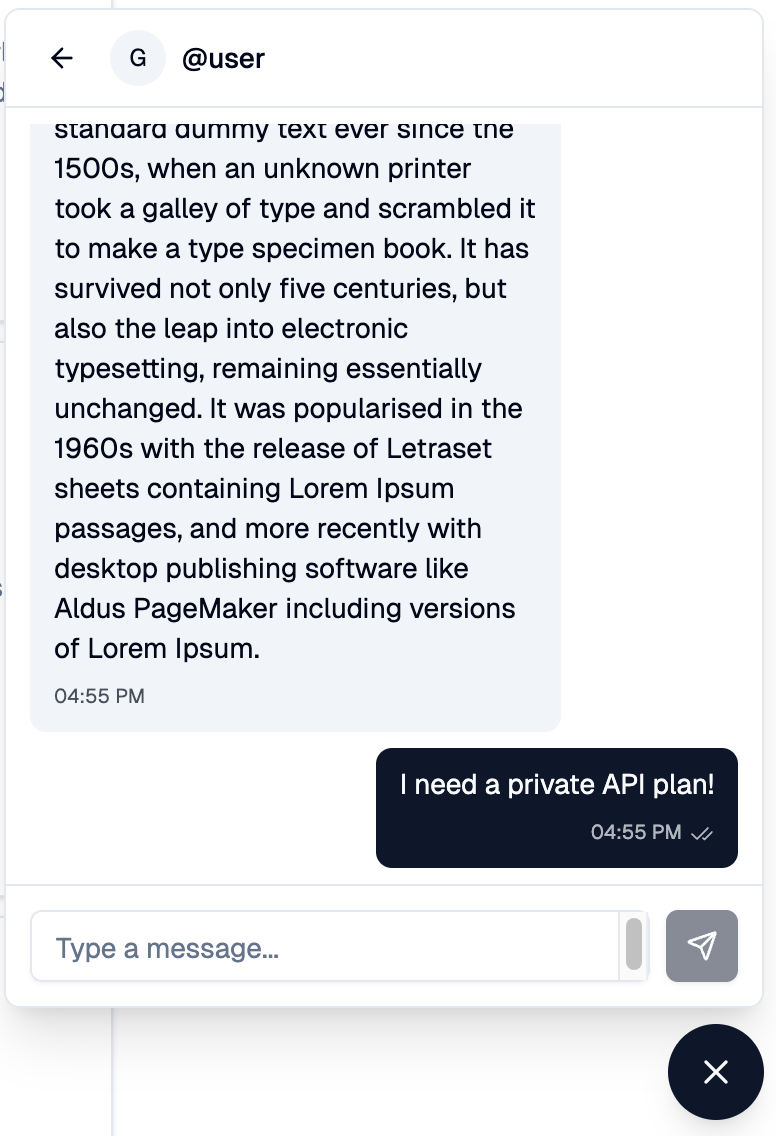
You can now send private messages to other users directly from the platform. A floating chat popup in the bottom-right corner shows your conversations with delivered (✓) and seen (✓✓) ticks, and a Message button on user profiles opens a chat with that user. Who you can message: API providers (anyone with at least one public API), users you have a current or past subscription relationship with (including cancelled subscriptions, so you can still reach support after cancelling), and anyone who has previously messaged you. Email notifications for unread messages are batched every few minutes and only sent if you haven’t seen the messages in-app, so active users aren’t spammed. Email content is intentionally limited to the sender’s username — message content stays inside the platform.
Image

Subscription Transfers in Studio

API providers can now transfer a customer’s subscription to a different plan on the same API directly from Studio → Subscriptions. How it works:
  • Paid target plan — the user receives a notification and must approve the transfer before their current period ends. On approval, the existing subscription is canceled and the new paid subscription starts immediately, with the charge collected from the user’s wallet first and from their default payment method if needed.
  • Free target plan — the user is notified but no approval is required. The transfer is applied automatically at the end of the current period.
Providers can also tick “Cancel subscription if not approved” when creating a transfer. With this option enabled, rejecting the request or letting it expire cancels the user’s current subscription on the API. The consequence is stated up front in the user’s notification email so it is never a surprise. Pending transfers are visible on both sides:
  • The provider sees a Transfer Awaiting Approval or Transfer Scheduled badge on the subscription row, with a tooltip showing the target plan, the deadline, and whether cancel-on-reject is set.
  • The customer sees a banner on Workspace → Subscriptions with Review & Accept and Reject actions. The accept modal shows the exact amount that will be charged, the renewal period, the credits per period, and (if applicable) the pay-as-you-go tier breakdown.
Either party can cancel a pending transfer before it is resolved. Documentation: Managing Customer Subscriptions (provider) · Managing Your Subscriptions (consumer)

Provider-Initiated Subscription Cancellations

Providers can now cancel a customer’s subscription directly from Studio → Subscriptions using the Cancel button on any subscription row. This terminates the subscription immediately and notifies the user by email. Use this for terms-of-service violations, fraud, or off-platform agreements to end a subscription.

Cancel at the End of the Period

The At the end of the period option in the cancellation dialog now works end to end. Choosing this leaves your subscription active until the current period closes, lets you keep using your remaining credits, and skips the next renewal charge. Subscriptions in this state are clearly marked with a Cancellation Scheduled badge alongside the active status. You can revert the schedule at any time before the period ends with the new Undo Cancellation button — your subscription will continue to renew normally as if nothing happened.

One Active Subscription per API

A user can only hold one active subscription on a given API at a time. Subscribing to a new plan on an API where you are already subscribed automatically cancels the existing subscriptions on that API. The pricing page now warns you about this before you confirm, listing exactly which plans will be canceled. This rule also applies to provider-initiated transfers: accepting a transfer or letting a free-plan transfer auto-apply will cancel any other subscriptions you hold on the same API.

FAQ Pages for APIs

API pages now have an optional FAQ tab where consumers can browse frequently asked questions and answers. Providers can manage FAQs from Studio → API → FAQ — add, edit, reorder, and delete entries at any time. Answers support Markdown formatting. The FAQ tab appears automatically on the public API page once at least one entry exists.